
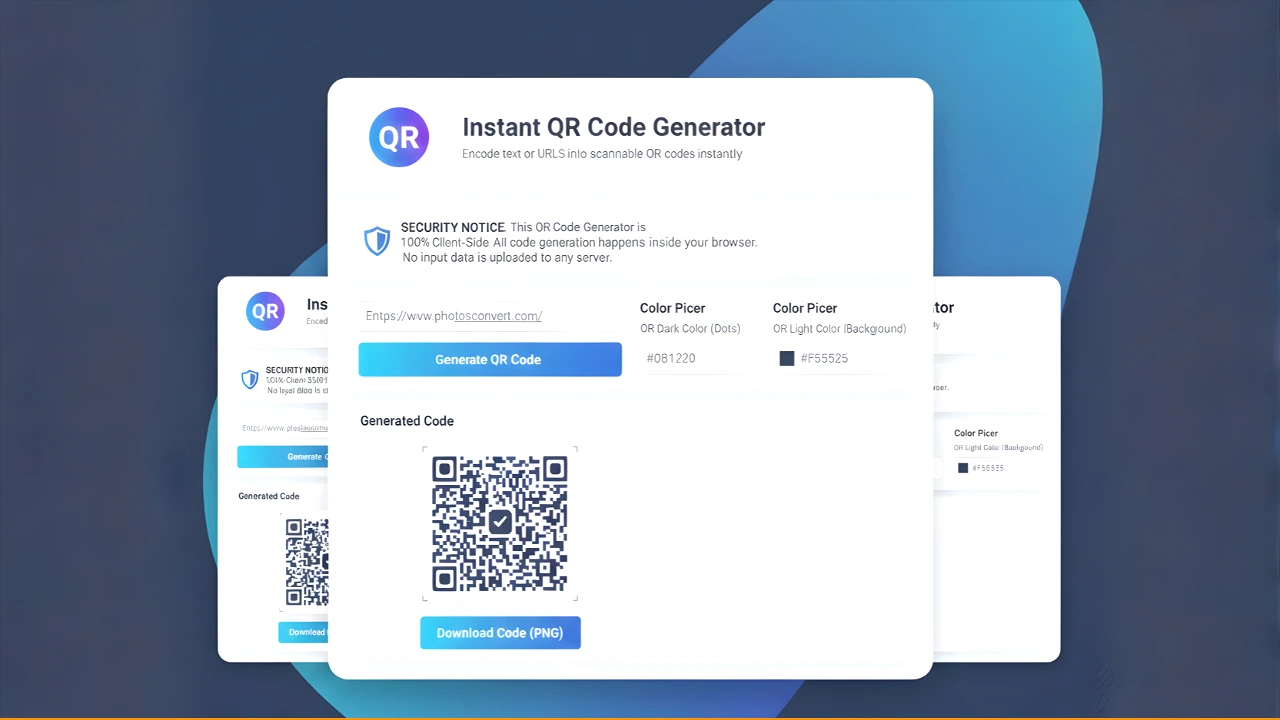
Instant QR Code Generator
Encode text or URLs into scannable QR codes instantly
Generated Code
Domain Verification Failed
This tool is restricted to run only on photosconvert.com.
PhotosConvert Instant QR Code Generator
Welcome to the ultimate client-side QR Code generation tool! This generator is designed for speed, security, and high-quality output, allowing you to create custom, scannable QR codes for any text or URL instantly.
Key Features and Benefits
This QR Code Generator is built to be a high-performance, secure, and customizable utility for your website users.
| Feature | Benefit |
| Client-Side Processing (Ultimate Security) | Data Stays Local: The entire QR code generation process runs exclusively in the user’s own web browser using JavaScript. Your input data (URLs/Text) never leaves your device or touches any server, guaranteeing maximum privacy and speed. |
| High-Resolution PNG Output | Crystal Clear Quality: Codes are generated internally at 768×768 pixels, ensuring sharp, high-quality PNG downloads suitable for printing, large displays, and professional use. |
| Full Color Customization | Total Brand Control: Easily select or manually input Hex Codes for both the Dots (Dark Color) and the Background (Light Color) to perfectly match your website or brand identity. |
| Robust Code Encapsulation | Zero Conflict: The code is wrapped in an IIFE (Immediately Invoked Function Expression) to prevent variable collision and ensure it will not interfere with any existing JavaScript or functions on your photosconvert.com website. |
| Domain-Locked Security | Exclusive Use: This specific build is hard-coded to function only on the photosconvert.com domain, providing an extra layer of security and integrity for your application. |
How to Use the QR Code Generator
Using the PhotosConvert QR Code Generator is fast and simple. Follow these three steps:
Step 1: Input Your Data
In the “Enter Text or URL to Encode” field, type or paste the information you want the QR code to contain (e.g., your website link, a specific document URL, or a short message).
Step 2: Customize Your Colors
Use the color picker or manually edit the Hex Code fields to set your desired colors:
- QR Dark Color (Dots): This is the color of the squares and patterns that hold the data.
- QR Light Color (Background): This is the background color of the code. (Note: Using white or a very light color is recommended for best scanning results.)
Step 3: Generate and Download
- Click the large “Generate QR Code” button. The code will instantly appear in the preview box below.
- If you are satisfied with the result, click the “Download Code (PNG)” button. The high-resolution PNG file will save directly to your computer.
Frequently Asked Questions (FAQ)
Security Notice: This QR Code Generator is 100% Client-Side. All code generation happens inside your browser. No input data (URLs or Text) is uploaded to any server.
Q1: Is the data I enter safe? Does it get sent to a server?
A: The data is completely safe and private. The entire process is Client-Side, meaning the data you input stays entirely on your own device and is never transmitted to our server or any third-party server.
Q2: Can someone else change the destination URL?
A: No. Because the code is generated locally in your browser, and no server interaction is involved, there is no opportunity for external interference or malicious redirection of the URL or text encoded in the QR code.
Q3: Why is the download quality so high (768px)?
A: We use a high internal resolution (768×768) to ensure the generated PNG is of professional quality. High-resolution codes are essential for sharp printing and reliable scanning, even when displayed or printed in larger formats.
Q4: What happens if I try to use this tool on another website?
A: This specific code is configured with a Domain Restriction. If you try to run it on any domain other than photosconvert.com, the tool will display a “Domain Verification Failed” message and the generator functions will be deactivated.
Q5: Can I use colors other than black and white?
A: Absolutely! You can select any color using the color pickers or by typing in the exact Hex Code (e.g., #FF0000 for red). Just ensure there is a high contrast between the dark (dots) and light (background) colors for the QR code to be reliably scannable by devices.
| Category | QR Code Generation |
|---|---|
| Developer | PhotosConvert.com |
| Version | 1.0 |
| License | Freeware |
| Platform | Windows, macOS, Linux, Android |
| Size | Online Web Application |
| Features |
|
| Price | Free |
| Updated | August 15, 2026 |

This Instant QR Code Generator is super fast and incredibly easy to use! 🔥 Loved how smoothly it works — perfect for quick sharing and professional use. Great job! 🚀
Hi Harper, thank you so much for your wonderful feedback! We’re thrilled to hear that you found our QR Code Generator fast and easy to use. Providing a smooth experience for our users is our top priority, and your support really motivates us. Feel free to use it anytime!