
Profile Picture Border & Frame Generator
Add professional borders, custom LinkedIn frames, and official verified badges to your profile picture in just one click.
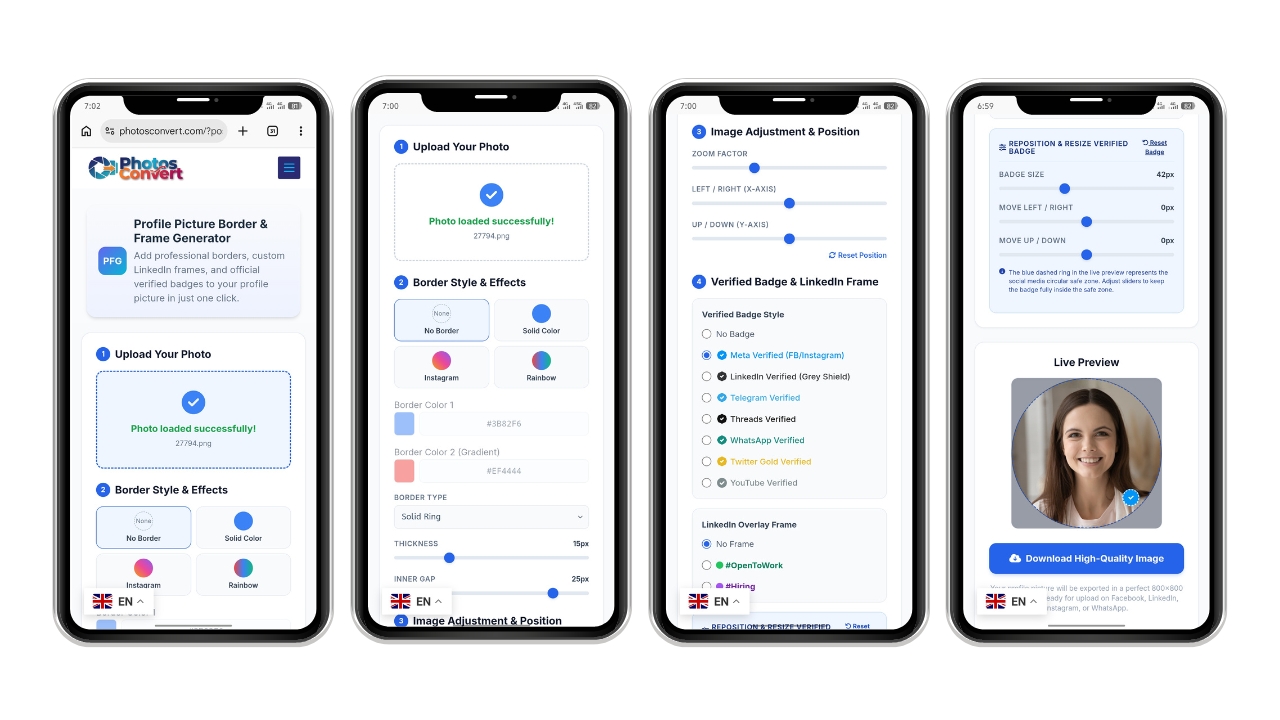
1 Upload Your Photo
Click here or drag to upload your photo
PNG, JPG, or WEBP (Up to 10MB)
Photo loaded successfully!
2 Border Style & Effects
3 Image Adjustment & Position
4 Verified Badge & LinkedIn Frame
Verified Badge Style
LinkedIn Overlay Frame
Reposition & Resize Verified Badge
The blue dashed ring in the live preview represents the social media circular safe zone. Adjust sliders to keep the badge fully inside the safe zone.
Live Preview
Your live profile picture preview will appear here once you select a photo.
If the download didn’t start automatically, tap and hold (on mobile) or right-click the image below and select “Save Image As”:
Your profile picture will be exported in a perfect 800×800 square format ready for upload on Facebook, LinkedIn, Instagram, or WhatsApp.
How to Create Professional Social Media Profile Pictures
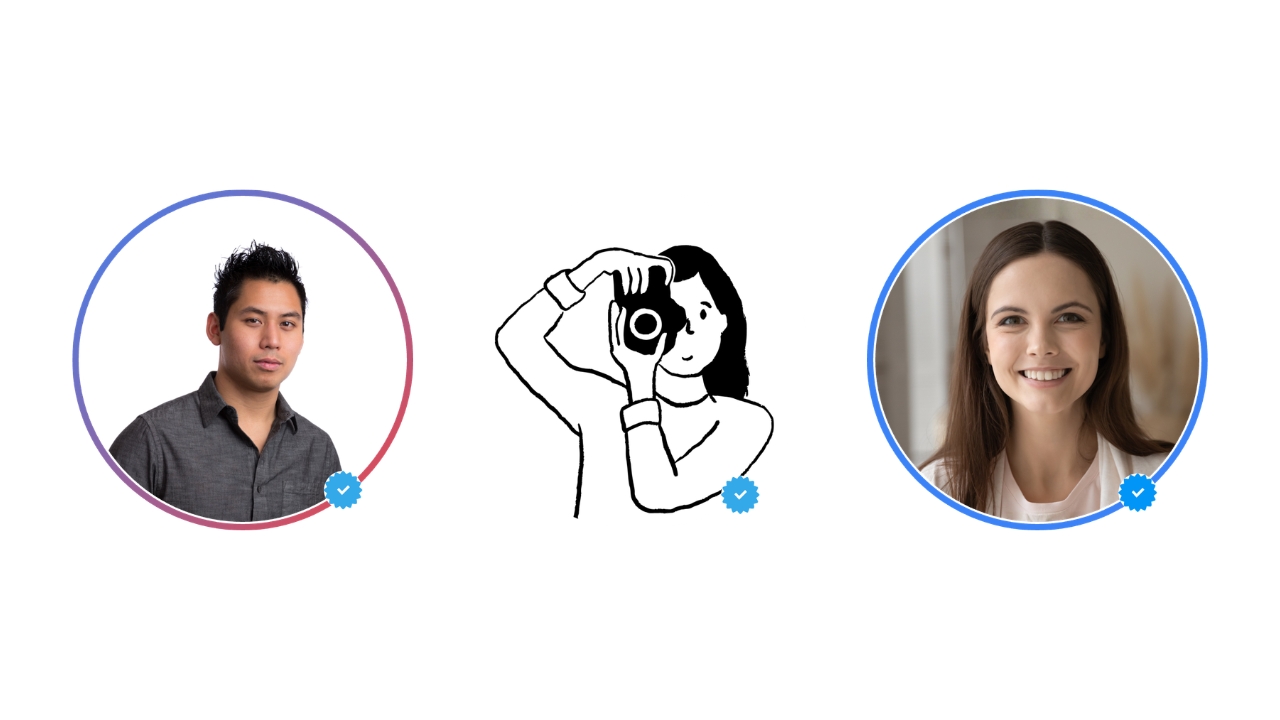
Your profile picture is often the very first impression people have of you online. A personalized, custom border makes your profile stand out instantly in busy feeds. Whether you want to add an eye-catching Instagram-style gradient ring, a formal professional border, or the highly requested official verified badge, this tool does it all instantly.
100% Official Verified Badge Layouts
Our badges are built following the exact official patterns. Inspired directly by official visual assets (such as “images (1).jpeg”), we utilize a mathematically calculated 16-pointed starburst pattern with beautifully rounded corners and thick, clean block-ended white checks. Give your profile picture that authentic, clean aesthetic without pixelation.
Privacy-First Browser Processing
Your security is our absolute priority. None of your photos are uploaded, processed, or saved on our servers. All modifications, circular cropping, and styling calculations are computed locally inside your own web browser using modern canvas render pipelines.
Why Your Profile Picture is Your Best Asset Online
We live in a world where we meet people online before we ever shake their hands in person. Whether you are applying for a job, joining a new community, or just catching up with old friends, your profile picture is the first thing everyone sees. It’s your digital handshake.
A high-quality, well-framed profile picture shows that you are professional and take pride in your personal brand. On the flip side, a blurry or plain photo can sometimes get lost in the noise of a busy social media feed. We created this tool to help you stand out, feel confident, and make that first impression count—without needing to spend hours learning complicated design software.
What Makes This Tool Different?
You might be wondering, "Why use this tool instead of the dozens of others out there?" We keep things simple for a reason:
- Your Privacy is Our First Priority: We know how personal your photos are. That is why we built this tool differently. Unlike other websites that upload your files to their servers, our tool does all the work right here on your own device. Your photo never leaves your browser, and it is never stored or seen by anyone else. You can edit with peace of mind.
- Designed for Clarity and Style: We didn’t just want to add simple frames. We spent time researching what makes a profile picture look "official." Whether it is the thickness of a border or the exact placement of a verified badge, everything is calculated to look crisp, professional, and high-resolution on every platform.
- Built for Everyone: You shouldn't have to be a tech expert to make your photo look good. We’ve kept the interface clean and straightforward. You just pick your photo, choose your style, and download it. It’s that simple, no matter if you are using a desktop computer or your mobile phone.
Pro-Tips for a Stunning Profile Picture
If you want your photo to really pop, here are a few simple things you can do before using our generator:
- Focus on Lighting: Try to use a photo where your face is well-lit. Natural light, like standing near a window, is usually the best.
- Center Yourself: Once you upload your photo to our tool, take a moment to use the zoom and position buttons. Getting your face perfectly centered makes a huge difference in how professional the final result looks.
- Choose the Right Frame: If you are looking for work, use our "#OpenToWork" frame—it is a great way to signal to recruiters that you are available. If you just want a clean look, try our solid color borders; they add a touch of personality without distracting from your photo.
We are constantly updating this tool based on what our users need. If you find yourself wishing for a specific frame or a new feature, please let us know. This project is for you, and we love hearing your ideas.
Frequently Asked Questions (FAQ)
-
Is this tool really free to use?
Yes, it is 100% free. We believe that everyone should have access to tools that help them build their personal brand, without having to worry about hidden costs or subscriptions. You can find all our utilities at our main tools library.
-
Will my photo be saved on your servers?
Absolutely not. Since the entire editing process happens locally in your own web browser, we never see your files, and we certainly don’t store them. Your photos stay exactly where they belong—with you.
-
Can I use this for creative projects too?
Of course! While this tool is designed for profile pictures, we have plenty of other utilities available for all kinds of creative work. For instance, if you are planning to make some festive graphics, you can check out our New Year Image Generator.
-
What if I have trouble adjusting the photo?
It happens! If your photo isn't sitting right, try the "Reset Position" button and start the adjustment process over. If you are on a phone, try rotating your screen to landscape mode—sometimes having more screen space makes it much easier to fine-tune the positioning.
-
Does this work on all social media platforms?
Yes. Because our tool exports your image in a clean, high-resolution square format, it will look great on Facebook, LinkedIn, Instagram, WhatsApp, or anywhere else you decide to use it.
| Category | Image Editor & Social Media |
|---|---|
| Developer | PhotosConvert.com |
| Version | 1.0.0 |
| License | Freeware |
| Platform | Works on any web browser (Chrome, Safari, Firefox, Edge) - Mobile - Desktop |
| Size | Online Web Application |
| Features |
|
| Price | Free |
| Updated | August 15, 2026 |


I’ve tried a bunch of online converters, but honestly, this one is the best. No annoying ads, no sign-ups, and it handles everything so fast. The image quality stays perfect every time. Seriously, a lifesaver if you deal with files all day!